

Project Tesoro
Private Beta v0.1Now playing, right at the top of your Mac.
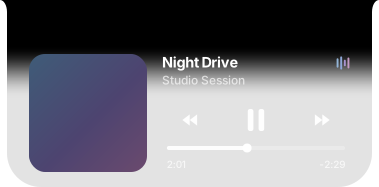
Artwork, title, artist, controls, and progress stay within reach at the top center of your screen. It expands when you approach it and becomes compact when it isn't needed.
Still refining
Upcoming improvements
-
Smoother long titles
Exceptionally long track names will move in one continuous loop, without jumping back to the start.
Planned for v0.1.1
-
Ongoing visual refinement
Continued improvements to material, depth, contrast, motion, and macOS integration—without sacrificing readability or performance.
Ongoing
-
Four notes, always there
Keep four quick notes inside Project Tesoro. Your text stays saved through app restarts and Mac restarts until you choose to delete it.
Planned
-
Model activity at a glance
See your active ChatGPT, Codex, Claude, and Grok sessions from Project Tesoro, so you can quickly tell what is still working and where to return.
Planned
Plans may change as the private beta develops.
The island in use
Two states, and everything between them.
Project Tesoro stays compact while you work and opens into full controls when you move toward it. The change is one continuous, reversible movement — approach it halfway and turn back, and it follows you back.

Compact, while you work.
A small solid island at the screen top holds the artwork, the title, and the four activity elements. It sits above your windows without taking space from them.

Paused, and it says so.
When playback stops the four elements settle into four equal dots. Nothing keeps moving once you have stopped — you can tell the state at a glance, without reading anything.

Expanded, with full controls.
Play and pause sit at the center, with previous and next on either side where the source app offers them. Apple Music and Spotify offer all three; QuickTime Player offers play and pause.

Click to seek, or drag.
Click anywhere on the progress track to jump there, or drag the handle and release. Elapsed and remaining time update with the handle, so you always land where you meant to.
Clicking the artwork, the title, or the artist brings the app that is playing to the front — one click, one app, no playback change.
The visualizer
Four elements. Always four.
The small activity indicator beside the title is made of exactly four elements — not three, not six. They take their color from the album artwork, so the indicator belongs to whatever is playing.
- Exactly four elements. One fixed count, in every state and every app.
- Artwork-derived color. Colors come from the current artwork, so they change with the music.
- Four equal dots while paused. The elements settle rather than freeze mid-motion.
- Artwork-aware contrast. Very dark album art would leave the elements invisible against the island, so their colors are lifted until they read clearly.


Artwork and orb
Artwork when it's ready. A quiet orb until then.
When artwork is available it fills the square on the left. While it is still loading — or when the source has none to give — a soft orb holds the same position, instead of an empty box or a spinner.
- Artwork when available. Shown as soon as the source provides it.
- A quiet orb while loading. The same orb is used everywhere a placeholder is needed.
- Smooth replacement. When the artwork arrives it takes the orb's place without a jump.
- QuickTime fallback. QuickTime Player exposes no artwork, so the orb stays for the whole clip.

Supported apps
Works with the apps you already use.
Every capability below comes from a public macOS interface — nothing is scraped or inferred.
-
Apple Music
- Album artwork
- Title and artist
- Play and pause
- Previous and next
- Progress and seeking
- Opening the app from the island
-
Spotify
- Album artwork
- Title and artist
- Play and pause
- Previous and next
- Progress and seeking
- Opening the app from the island
-
QuickTime Player
- Document titles
- Play and pause
- Progress and seeking
- Opening the app from the island
When more than one supported app is playing, Project Tesoro follows the session you started or resumed most recently — the island matches the thing you just acted on.
On your battery
Designed to stay quiet.
An app that lives on screen all day has to earn the space. Project Tesoro does less when less is needed, and it does it without asking you to manage anything.
Normal Mode
While your Mac is running normally, the island animates and updates at full smoothness — the movement that tells you what happened is never the thing that gets cut.
Low Power Mode, handled automatically
When macOS enters Low Power Mode, Project Tesoro notices and reduces its hidden work to match. You do not switch anything on.
Less hidden work
The reduction happens in the work you never see — background sampling and refresh behavior — rather than in the interface you are looking at.
No quality setting to manage
There is no quality slider and no separate Low Power preference, because there is nothing for you to decide. It responds to your Mac, and the island keeps looking like the island.
Private by design
Your media stays on your Mac.
Project Tesoro does not collect or store your media information. It reads what is playing so it can show it to you, and that is where it ends. No analytics, tracking, telemetry, or advertising. Playback information and artwork processing remain local to your Mac.
What stays on your Mac
- Media information — title, artist, artwork, and position — stays local to your Mac.
- Artwork is processed on your Mac, including the colors the visualizer derives from it.
- Nothing about what you play is sent to tesaurex or anywhere else.
- Supported media apps are reached through normal macOS Automation permission, which you grant per app.
What Project Tesoro never asks for
- No analytics and no telemetry.
- No Screen Recording permission.
- No Accessibility permission.
- No Input Monitoring.
- No microphone and no camera access.
- No reading of browser history or browser page content.
For the curious
How it behaves, in more detail.
None of this is needed to use Project Tesoro. It is here because some of the decisions are the interesting part.
Choosing which app to follow
Project Tesoro shows one media session at a time. When several supported apps have something loaded, it follows the one you started or resumed most recently, so the island matches the thing you just acted on.
New metadata arriving from a different app does not take the island away from the app you are actually listening to. A track change in the background stays in the background until you start that session yourself.
How the island opens and closes
Opening and closing are driven by time rather than by a queue of separate steps, so the movement is fully reversible. If you approach the island and turn away halfway through, it returns from exactly where it had reached instead of finishing an animation you interrupted.
The material is a function of position rather than a second animated value: the shell's height is the only thing that moves. The solid top and the ombré below it cannot drift out of step with the shape, and no endpoint can flash.
Progress between updates
Media apps report their position periodically rather than continuously. Project Tesoro projects smoothly between those samples, so the bar and the elapsed and remaining labels move evenly instead of stepping.
Elapsed, remaining, the filled track, and the handle all derive from one snapshot, so they cannot disagree with each other, and a finished track reads 0:00 rather than a negative value.
Artwork handling and contrast
Artwork is loaded and processed on your Mac, and a bounded cache keeps recently seen artwork so returning to a track does not repeat the work. Nothing about the artwork leaves the machine.
The visualizer's colors are derived from the artwork. Very dark artwork would produce elements that disappear against the island, so the derived colors are lifted until they stay visible.
One window, one process
Project Tesoro runs as a single application process presenting a single island window. Locking and unlocking, switching users, or leaving it running for days does not accumulate extra windows or duplicate processes.
One animation clock drives the foreground, so nothing competes to redraw the island.
Compatibility
What it runs on today.
Designed for
Designed for Apple-silicon MacBooks with M1 or newer and macOS 15 or later.
Testing in progress
Broader MacBook and display testing continues during the private beta.
Installation
Installing the beta.
Project Tesoro v0.1 is available to trusted testers using Apple-silicon Macs running macOS 15 or later. Installation takes about a minute and never involves the Terminal.
- Open the trusted-tester page.
- Download Project Tesoro.
- Extract the archive when required.
- Move Project Tesoro into Applications.
- Launch it once.
- Complete the documented macOS approval flow.
- Approve Automation access for supported media apps when asked.
- Project Tesoro registers itself to open at login.
- Forced Ghostage handles future approved updates automatically.
This unsigned trusted-tester beta is not signed through Apple's paid Developer ID program, so macOS requires a one-time approval. Follow the documented macOS approval flow; it never involves the Terminal and never lowers your Mac's security.
Updates
Private beta
Feedback Portal Coming Soon
A dedicated place to report problems, share private-beta feedback, and suggest improvements is coming soon.
Get Project Tesoro.
v0.1 · Private Beta · Build 8 — bundle 0.1.0 · Apple silicon / arm64 · macOS 15.0. Project Tesoro v0.1 is available to trusted testers using Apple-silicon Macs running macOS 15 or later.